
.webp&w=3840&q=75)
It's Saturday morning and you posted the new offer on your Page. Cut and finish, $30, this week only.
By the time you finish your second client, there are thirty-one comments. Most say the same three things: how much, are you open Sunday, do you have space today.
You answer them at nine that night. Four of those people booked somewhere else hours ago.
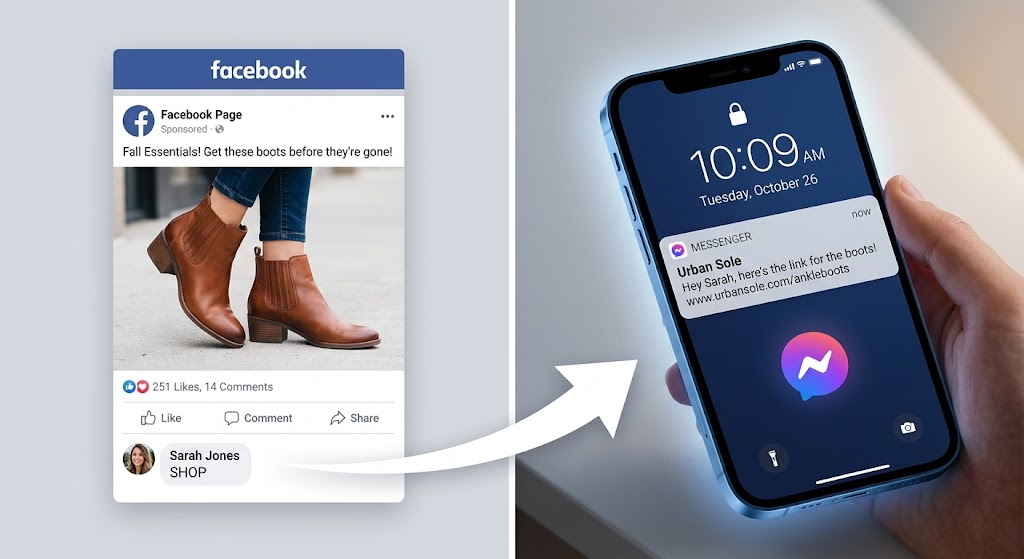
An auto reply for a Facebook comment is an automation that watches your Page's posts and responds the second someone comments. It can post a public reply under their comment and send that same person a private Messenger message at the same time, delivering your price list, your booking link, or your hours without you touching your phone.
This guide covers what Meta's rules actually permit, what to write, how to keep the automation from replying to people who aren't asking anything, and how to build the flow yourself in a few minutes.
What Missed Comments Cost a Small Business
A comment on a local business post is rarely a compliment. It's a booking request with the phone number missing.
Someone asking "how much?" under your Page post has already decided they're interested. They just need one number and a way to book. The gap between their question and your answer is where the money goes.
An Facebook automation doesn't fix your reply quality. It fixes the first thirty seconds, the acknowledgement, the price, the link, so the person doesn't drift off to the next Page in their feed.
What Each Tactic Actually Does
| Tactic | How it works | What to expect |
|---|---|---|
| Keyword-triggered DM | Someone comments BOOK. They get a Messenger message with your booking link. | Removes the "where do I book?" step; the enquiry lands somewhere you can track |
| Catch-all public reply | Anyone comments anything. Your Page replies publicly with a short, varied line. | Nobody gets ignored; your Page looks staffed even when it isn't |
| FAQ auto-answers | Comments containing "price," "hours," or "parking" get the matching answer. | Cuts the copy-paste work that eats your evening |
| Event or offer capture | "Comment SPOTS for the class list" during a promotion. | Collects interested people into one inbox instead of one long comment thread |
Every one of these can be built with Reflys' automation builder —start your 7-day trial.
What Does Meta Actually Allow?
You can absolutely do this, and it's a documented feature — not a loophole. But the rules are specific, and breaking them is how Pages get their messaging restricted.
Meta calls it a private reply, and it has its own entry in theMessenger Platform documentation. When someone comments on your Page post, your Page may send them one single Messenger message in response, and that's allowed within seven days of the comment. The person also sees a reference to the comment they left, so the message doesn't arrive out of nowhere.
That one message is your only free swing. After it, you're waiting.
The moment they reply — typing anything back, or tapping a button in your message — the 24-hour standard messaging window opens. Inside that window you can send follow-ups, and Meta'sMessenger Platform policy permits promotional content there. Every new message from them resets the clock.
When the window closes and they've gone quiet, you stop. Sending anyway is what triggers policy warnings. Message tags cover a narrow set of approved cases outside the window — including a Human Agent tag that lets a real person reply manually for up to seven days — but a marketing blast isn't one of them.
Two rules people miss. Automated bots must respond to any input from the user, and within 30 seconds, free text, quick replies, buttons, menu taps all count. A flow that leaves someone typing into silence isn't compliant.
And where local law requires it, an automated chat has to say it's automated. Meta'sDeveloper Policies single out California and Germany for particular attention here. A line as simple as "you're chatting with our booking bot" covers it, and it costs you nothing in conversions — people are more forgiving of a bot that admits it.
| Meta's rule | What it means for you |
|---|---|
| One private reply per comment | Make the first message count. Don't split it into three. |
| Seven days from the comment | Old posts still work. Someone commenting on last Tuesday's post is reachable. |
| 24-hour window opens on their reply | Your first message's job is to earn a reply, not to close a sale. |
| Bots must answer all input, within 30 seconds | Give every branch a response, including "none of these." |
| Disclose the bot where law requires | One short line at the start of the thread. |
If your Page does breach something, Meta notifies admins through the Page Support Inbox and gives you a window to fix it before messaging gets limited — so check that inbox, not just your notifications.
These rules change more than once a year. Check the current policy before you launch anything, and again before any big promotion. [POLICY REVIEWED: August 2026 — Messenger Platform policy last updated April 6, 2026. Re-verify quarterly]
Building inside these limits doesn't take a developer.Reflys' Messenger automationStart your 7-day trial.
Public Reply, Private Message, or Both?
Both, and they do different jobs.
The public reply is for everyone who reads the comments but never comments themselves — the far larger group. When they see fifteen questions answered under your post, they read your Page as responsive. When they see fifteen questions sitting untouched since Tuesday, they read it as closed.
The private message is where the actual conversation happens. You can send a price list, a booking link, or a menu without publishing your calendar to the whole internet.
Keep the two different. The public reply is short and human: "Sent you the details." The private message carries the substance.
One warning about public replies. If your Page posts the identical sentence under forty comments in a row, that pattern reads as spam — to people and to automated filters. Write four or five variations and let the tool rotate them.
What Should the First Message Say?
Its only job is to get a reply. Everything else depends on that.
Remember the sequence: one message, then silence until they respond. So a first message that delivers everything and asks for nothing is a dead end. A first message that answers their question and offers a next step gets you into the 24-hour window where you can actually help.
A working shape for a salon:
"Hi! Thanks for asking — cut and finish is $30 this week. Want me to check what's free this weekend?" [Yes, check times] [Send me the full price list]
Both buttons open the window. Then you can send the times, take the booking, and answer the follow-up about parking.
Three things to keep out of it. Don't open with a paragraph — Messenger previews cut off fast. Don't sound like a form letter; you're a local business, and that's the advantage. Don't ask for a phone number in the first message, because it reads as a trap before you've given them anything.
If you're running a giveaway or a competition through the flow, say plainly in the post what the entry terms are and who's running it. Contest rules vary by platform and region, and a prize draw that hides its terms is the kind of thing that gets a Page reported.
Which Tool Fits a Local Business?
Most of the well-known platforms are built on the same official Meta APIs, so safety isn't the deciding factor between them. What differs is price predictability, how much setup they expect, and what happens when your contact list grows.
Reflys — omnichannel, with Messenger, Instagram, WhatsApp and TikTok on one plan. Thefull Messenger feature list covers the comment trigger, the shared inbox and agent routing; native Shopify, WooCommerce and BigCommerce sync matters if you sell online as well as in person. If you want to see how it's used in your trade specifically, theindustry page breaks it down by business type.
ManyChat — the deepest template library in the category and a long track record on Messenger specifically. Genuinely good at what it does. The trade-off is that pricing scales with active contacts, so a post that performs unusually well can move you up a tier.
NapoleonCat — built for moderation and reputation management. Strong if your main problem is hiding abusive comments across several Pages. Weaker if your main problem is turning comments into bookings.
| # | Reflys | ManyChat | NapoleonCat |
|---|---|---|---|
| Best for | Bookings and orders from comments | Complex funnel building | Comment moderation |
| Official Meta API | Yes | Yes | Yes |
| Channels on one plan | Messenger, Instagram, WhatsApp, TikTok | Messenger, Instagram, WhatsApp, SMS | Multiple, moderation-focused |
| Free plan | No — 7-day trial on paid plans | Yes, limited | No |
| Paid from | About $12/month | About $14/month | About $67/month |
The fastest way to judge any of these is to build one flow and comment on your own post.Reflys takes about ten minutes to set up, and your 7-day trial lets you test it before you're charged.
Set This Up in Reflys in Under 10 Minutes
One flow: someone comments BOOK on your offer post, they get a public acknowledgement and a private message with your booking link.
1. Connect your Facebook Page. Create your account, open Channels, choose Messenger, and authenticate with Facebook. Your Page syncs immediately. You'll need admin access to the Page.
2. Start a new flow. Open the automation builder and create a flow. Choose the Facebook comment trigger as the starting block. The canvas shows the trigger on the left and empty slots to its right — that's where the reply and the message go.
3. Set your keyword. Select specific keyword rather than all comments, and enter BOOK. Add exclusions for anything you'd rather answer yourself. Choose top-level comments only for busy posts.
4. Write four public replies. Short and varied: "Just messaged you," "Details are in your inbox," "Sent it over." The tool rotates them, which keeps the thread from looking automated.
5. Draft the private message. Answer the question, then offer the next step with a button. Keep it under three lines. The button click is what opens your 24-hour window, so the button has to be worth tapping.
6. Test from a second account. Publish, then comment BOOK on the post from a personal account and watch the message arrive. Check it on a phone, not a desktop — that's where it'll be read.
Thestep-by-step help article has screenshots of each screen if you want them open alongside.
— it's live on your next post.
Why the Official API Matters
There's a market of cheap tools that automate Facebook comments without going through Meta at all — browser extensions that scrape your comment feed, or scripts that log into your account and send messages as you.
Avoid them. Meta detects automated behaviour outside its official API, and the consequence lands on your Page's messaging privileges. For a business whose bookings arrive through Messenger, losing the ability to message customers is not a small setback, and getting a restricted Page reinstated is slow.
Reflys runs entirely on the official Meta and WhatsApp Business APIs, plus the official TikTok API. Every message routes through Meta's approved infrastructure, which is what keeps your Page in good standing — though no platform can protect you from what you send, so the content rules in this guide still apply to you.
AReflys restaurant client ran automated flows across Messenger and WhatsApp and grew monthly online orders by roughly 35% with no additional ad spend. Billing runs through Stripe, and you can cancel from the billing portal.
Stop Losing Bookings in the Comments
Every unanswered comment on your Page is someone who was ready to book and got silence instead.
You don't need a full chatbot. You need the first thirty seconds handled — the acknowledgement, the price, the link — so the person stays with you long enough to actually talk.
Pin a comment with your keyword on the next post. Answer the obvious question in the caption. Then wire one flow so the people who ask get an answer while they're still holding their phone.

