
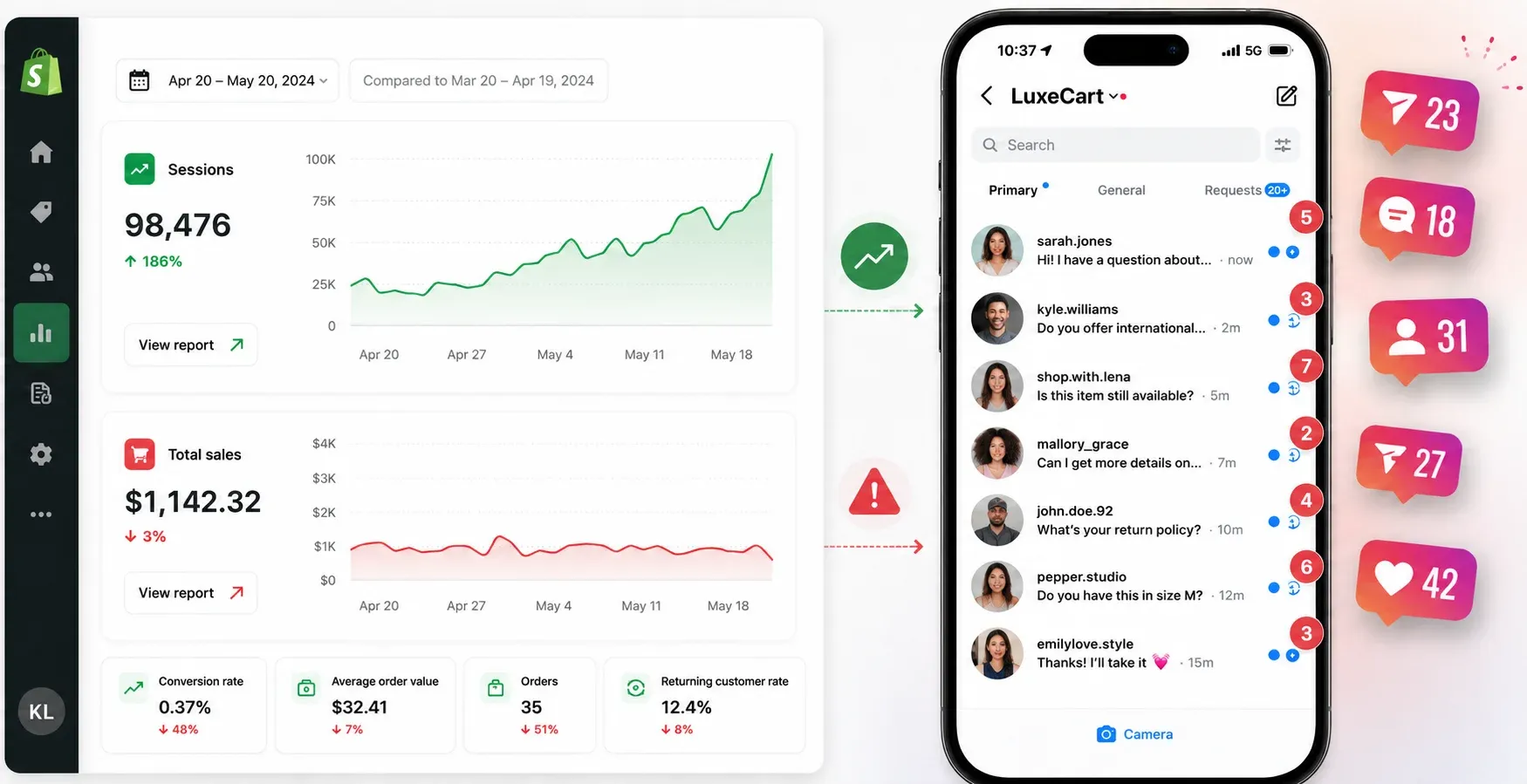
It's Thursday morning. Your Shopify dashboard shows a traffic spike from last night's Reel. Sales, though, are flat.
Open the inbox and it's clear why: forty unread DMs. Sizing questions, shipping questions, "is this back in stock." By the time you sit down to answer them, most of those people have already bought the thing somewhere else.
If you sell products online, your DMs aren't a side channel. They're where your most motivated buyers actually are. Someone who takes the time to comment or message you has already decided they're interested — they just need one more answer before they check out. The problem is you can't sit in your inbox all day, and a chatbot that only understands exact commands frustrates people faster than it helps them.
That's the gap a conversational AI platform is meant to close. Instead of matching rigid keywords, it works out what someone's actually asking, pulls live data from your store, and can move the conversation toward a sale without you touching your phone.
But "conversational AI platform" now covers a wide range of products with genuinely different strengths, and picking the wrong one for your situation is an expensive mistake. Some tools are website live-chat widgets that happen to connect to WhatsApp as an add-on. Others are built social-first, around Instagram and WhatsApp DMs specifically. Some need a developer to configure; others are ready in an afternoon.
Here's what's actually worth comparing before you commit to one, along with an honest look at where the main options land.
What a Conversational AI Platform Actually Does?
At a basic level, this kind of tool reads a customer's message, figures out the intent behind it is tracking a package, asking about sizing, wanting a discount code, and responds using live information pulled from your store. No menu-clicking, no waiting on a human, and ideally no dead end.
Why Rule-Based Chatbots Fall Short?
Older-style chatbots work off fixed commands. If a shopper types "where's my order," the bot needs to have been explicitly programmed to recognize that exact phrase. Ask it something slightly different, "has this shipped yet," "track my package", and it can break, dumping an error message on someone who was ready to buy.
Baymard Institute's research puts checkout abandonment among online shoppers at close to 70%, and a meaningful share of that comes down to unanswered questions at the moment someone needed a fast answer.
A modern platform works differently. It's built around intent rather than exact phrasing, so "where's my stuff," "track package," and "has it shipped" all get routed to the same answer, pulled straight from your Shopify or WooCommerce order data.
What to Actually Evaluate?
Before comparing specific products, it helps to know what separates them:
- Core focus. Is the tool built around social DMs (Instagram, WhatsApp), or is it a website chat widget that treats social channels as an add-on?
- Store integration. Does it read live order and inventory data from Shopify or WooCommerce natively, or does that require custom API work?
- Compliance. Is it running on the official Meta and WhatsApp Business APIs? This matters for account safety — more on that below.
- Setup time. Visual, drag-and-drop builder, or does it need a developer?
- Pricing model. Flat monthly tiers, per-contact billing, or per-conversation billing — and what does that actually cost at your volume?
How the Main Options Compare
This is where a lot of "best platform" articles get lazy — they compare one tool against a vague stand-in for "expensive enterprise software" and call it a day. Here's an honest look at three real options, using pricing pulled directly from each company's own pricing page as of July 2026.
| Features | ManyChat | Tidio | Reflys |
|---|---|---|---|
| Core focus | Social DM automation — Instagram, WhatsApp, Messenger, TikTok | Website live chat, with WhatsApp/Instagram as add-on channels | Social commerce automation for e-commerce (Instagram, WhatsApp) |
| Free plan | 25 active contacts/mo, 2 channels, 4 automations | 50 billable conversations/mo, 50 one-time AI conversations | No free plan — 7-day trial |
| Entry paid tier | Essential — $14/mo, 250 contacts | Starter — $24.17/mo, 100 conversations | Around $12/mo |
| Popular tier | Pro — $29/mo, 2,500 contacts, WhatsApp + AI included | Growth — from $49.17/mo; AI (Lyro) sold separately from $32.50/mo | — |
| Native Shopify/WooCommerce sync | Through integrations | Native Shopify actions on Growth and up | Native |
| Setup | Visual builder, no code | Visual builder; AI and automation sold as add-on modules | Visual builder, no code |
| Official Meta/WhatsApp API | Yes | Yes | Yes |
| Best for | Brands whose customers reach out mainly through Instagram/DMs and want broad channel coverage | Businesses that are website-first and want chat coverage on social too | E-commerce brands wanting cart recovery and comment-to-DM automation out of the box |
Worth being direct about: Tidio isn't really built for the same job as ManyChat or Reflys. It's a live-chat and help-desk product first, with WhatsApp and Instagram as connected channels rather than the main event. If your traffic and sales conversations genuinely live in Instagram DMs, ManyChat and Reflys are the more relevant comparison.
How These Platforms Actually Move Sales
A conversational AI platform earns its cost by doing more than answering FAQs, it should be actively pushing people through your funnel.
Comment-to-DM on product drops. Telling people to "click the link in bio" loses a chunk of them before they ever see the product. A comment-trigger keyword like "SHOP" instead sends the link directly into their DMs, keeping the whole interaction inside the app.
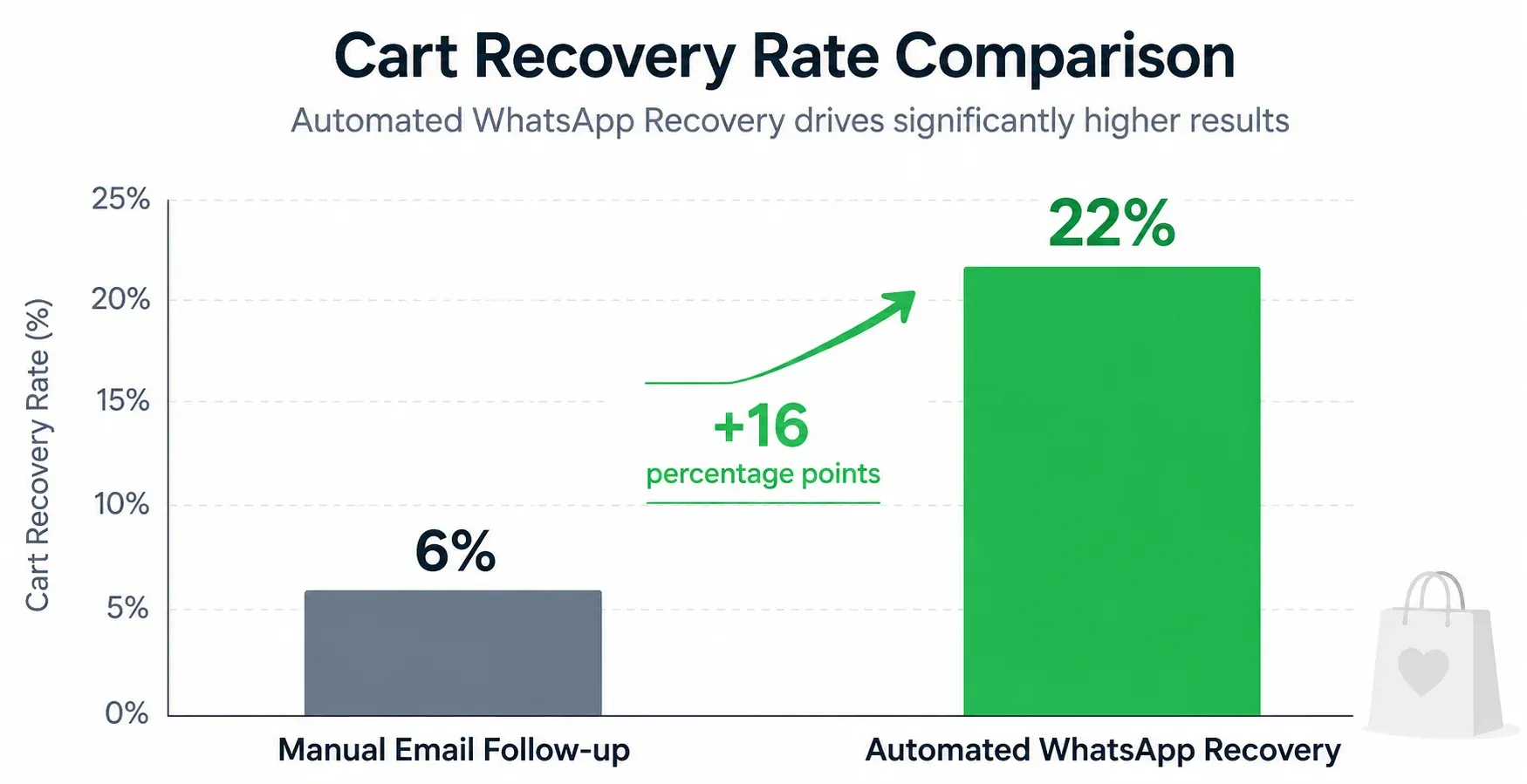
Cart recovery over WhatsApp. Email open rates hover around 20%. WhatsApp runs above 90%. When someone abandons a Shopify cart, a well-timed WhatsApp message — sent after a short delay, not immediately, recovers a noticeably higher share of those sales than an email ever will.
A human inbox for anything complicated. AI should handle routine questions, but a high-value or delicate issue needs a person. Look for a platform with a shared team inbox that routes escalations to staff with the full conversation history attached, so the customer isn't stuck repeating themselves.
Is Automating DMs Actually Safe?
This is a fair concern. Bulk messaging tools that scrape data or operate outside Meta's official channels do put your account at risk.
Platforms built on the official Meta and WhatsApp Business APIs are a different situation — staying within those boundaries meaningfully reduces (though doesn't eliminate) the risk of account restrictions. Look for a tool that builds compliance into the flow itself: respecting the 24-hour messaging window, and requiring WhatsApp broadcast templates to go through Meta's approval process before they can send.
As one data point: a Reflys restaurant client automated their WhatsApp ordering during high-volume weekends and saw monthly online orders climb roughly 35% — from 1,200 to 1,620 — without any added ad spend. Their abandoned-checkout recovery rate went from 6% to 22% once follow-ups moved from email to WhatsApp.
Setting Up a Cart-Recovery Flow: A Walkthrough
If you want to see what one of these tools actually looks like in practice, here's how a WhatsApp abandoned-cart sequence gets built in Reflys.
Connect your store and channel: In the dashboard, go to Integrations and connect Shopify or WooCommerce, then link your WhatsApp Business API number.
Fix your checkout first: Before automating anything, make sure your checkout page has a clear opt-in checkbox for WhatsApp updates, Meta requires this before you can send outbound marketing messages, regardless of which tool you use.
Build the flow: Open the flow builder, create a new automation, and set the trigger to Abandoned Checkout, pulled directly from your store data.
Set a delay: A 30-to-45-minute delay tends to work best. Message someone the moment they abandon their cart and it can feel intrusive; wait a full day and they've usually already moved on.
Write the message and submit for approval: Draft the recovery text and send it through Meta's template approval process from inside the dashboard. Pre-filling a small discount code into the checkout link tends to lift recovery rates further.
Test, then publish: Trigger a dummy abandoned cart to your own phone first. Once it looks right, publish it — from then on it runs in the background.
The Bottom Line
An unanswered DM is a lost sale, and that adds up fast when your traffic is coming from social. The right conversational AI platform depends less on which one is "best" in the abstract and more on where your customers actually message you, if that's Instagram and WhatsApp specifically, a social-first tool like Reflys is going to fit better than a website chat widget with social media bolted on.
Whichever you choose, the fastest way to know if it's right for you is to build one real flow and watch it run.

