
How to Start or Renew your Subscription
This guide will help you understand how to start your Reflys subscription, begin your 7-day trial, or renew your subscription if it has ended. We’ll also explain what to do if you face any issues related to permissions or billing.
Starting with a 7-Day Trial
To use Reflys, subscribe to a Pro or Business plan. Every plan starts with a 7-day trial. A payment method is required to start, but you are not charged until the trial ends, and you can cancel before then from the billing portal. You can only manage your Reflys subscription through our website. This option is not available in the mobile version.
Here’s how to start your trial:
- Log in to your Reflys account on the website.
- Go to Settings → Subscriptions → Billing from your dashboard.
- On the Billing page, you’ll see the available plans. Choose Pro or Business.
A Pro or Business subscription is required to use Reflys. Advanced AI tools and team seats are included with Business.
How to Renew Your Subscription
If your Pro or Business subscription has ended, you can easily renew it.
Here’s what to do:
- Log in to your Reflys account.
- Go to Settings → Billing → Manage Subscription
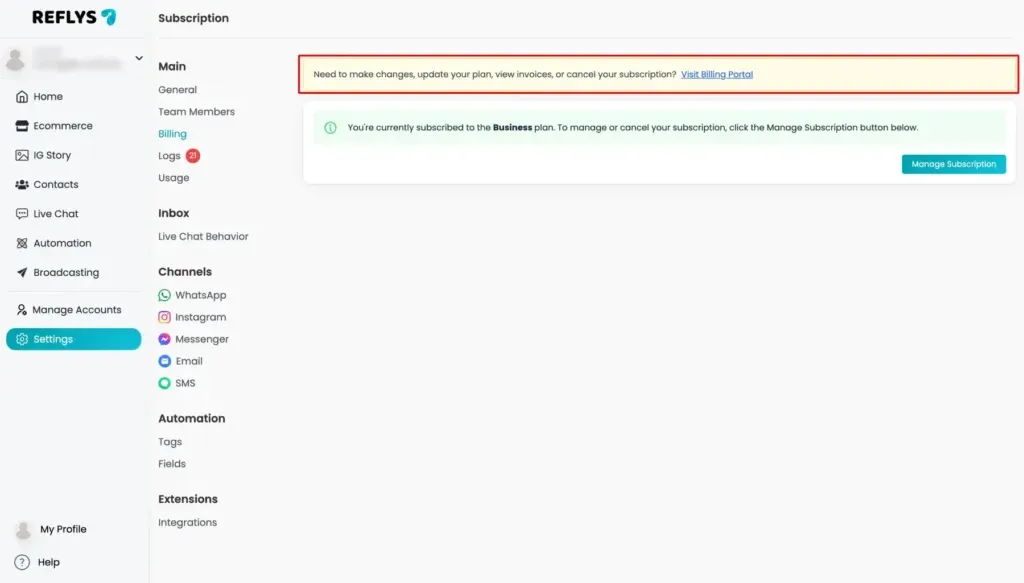
- On the Billing page, you’ll see the available plans. Choose the one you want.
- You can also click ‘View Billing Details’ to complete the renewal.
After this, your subscription will be active again, and you’ll get access to all the features included in your chosen plan.
If You See an Error About Billing Permissions
If you try to renew or manage the subscription and see any kind of error, like your account doesn’t have permission to access billing settings.
If you’re facing any issues while trying to upgrade your plan:
- Check the Help Center for common troubleshooting tips.
- If you still need assistance, please reach out to Reflys Support directly.

