
You set up your Shopify store or mapped out the content calendar for your local clinic. You open Instagram to create the account, and your exact business name is taken by a dormant account from 2014. Every variation you try feels clunky.
When your Instagram handle is hard to spell, people cannot tag you. If they cannot tag you, you lose the user-generated content, story mentions, and inbound DMs that actually drive revenue. You need a handle that customers can remember, type fast, and find across every other social channel.
What Is an Instagram Username?
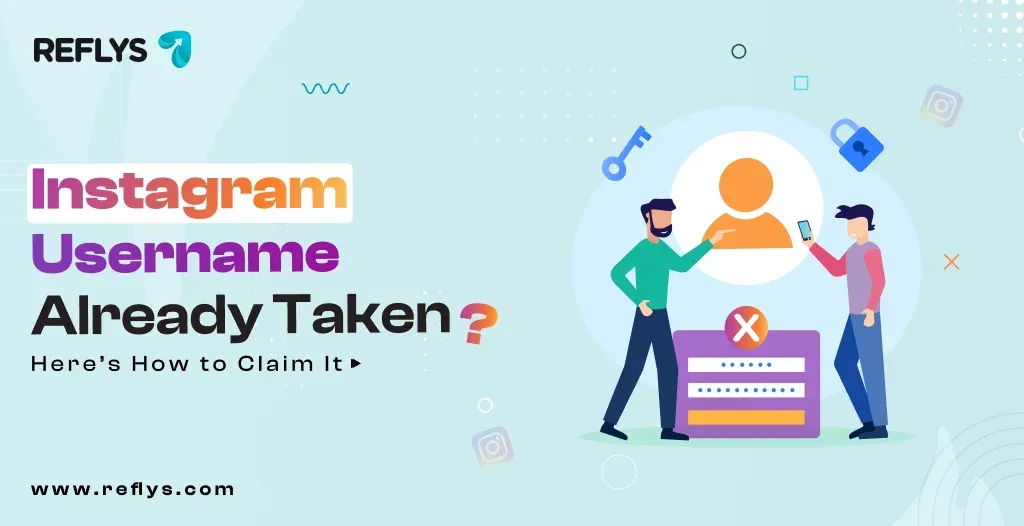
An Instagram username is your unique account identifier, formatted with an @ symbol (e.g., @reflys). It forms your profile URL and is how users tag or mention you. Your account name, on the other hand, is the non-unique display title that appears on your profile and is fully searchable.
The Difference Between Your Username and Account Name
Your username is your unique identity. It must be unique, contains no spaces, and is limited to 30 characters.
Your account name is your display name. It does not have to be unique. This is where you put your SEO keywords. If you run an e-commerce storefront for curated goods called AHD Collection, your username might be @ahdcollection. Your account name should be "AHD Collection | Curated Home Goods" so you show up when people search for your product category.
How to Check if an Instagram Username Is Taken?
You do not need a specialized Instagram username checker tool. The fastest way to verify availability is to type instagram.com/your-desired-username into your browser. If it says the page is unavailable, the handle is likely free or recently deleted.
To officially claim it, open the Instagram app, go to Edit Profile, and type it in. Instagram will instantly flag it with a green checkmark or a red error. Be aware that if an account is deleted, Instagram typically holds the handle for around 30 days before it re-enters the available pool — a longer window than the 14-day grace period you get for simply changing a username (see FAQ below).
How to Get an Instagram Username That's Already Taken
Instagram does not hand over a username just because the account using it looks inactive, and buying or selling usernames is against Instagram's Terms of Use. That leaves a few legitimate routes:
- Ask the owner. If the handle belongs to a real person or business, send a polite DM. If they change their username, you can claim the old one once it frees up.
- Wait for it to be released. When someone changes their username, Instagram holds the old one for 14 days in case they switch back. When an account is deleted, deletion completes 30 days after the request, and the handle can become available after that. Neither is guaranteed, so check again from time to time. Avoid third-party "username catcher" tools: most ask for your login, which puts your account at risk.
- Report a trademark violation. If the handle matches your registered trademark, file a report through the trademark form in Instagram's Help Center. This is the main case where Instagram itself may step in.
- Pick a close variation. Add your city, your category, or a word like "shop", "hq" or "official" (see the ideas below), then use the exact same handle on every channel.
5 Instagram Username Ideas When Yours Is Taken
Finding a clean variation requires sticking to formats customers already recognize. Avoid underscores or strings of numbers — they look like spam accounts and users mistype them.
- Add your industry or product — If you sell print-on-demand apparel, use @shop[name] or @[name]apparel.
- Add your location — If you manage a local physical therapy clinic or a neurology center, append your city. @PrimeSurgeryIndy is much easier to type than @PrimeSurgeryCenterIndiana.
- Use an action word — Formats like @try[name], @get[name], or @wear[name] work well for e-commerce and SaaS brands.
- Add "official" or "HQ" — A standard fallback for established brands moving to a new channel is @[name]official or @[name]hq.
- Use a domain extension — If you own the dot-com, use it. @[name]co or @[name]shop keeps the branding tied directly to your website URL.
Why Your Handle Must Match Across Channels?
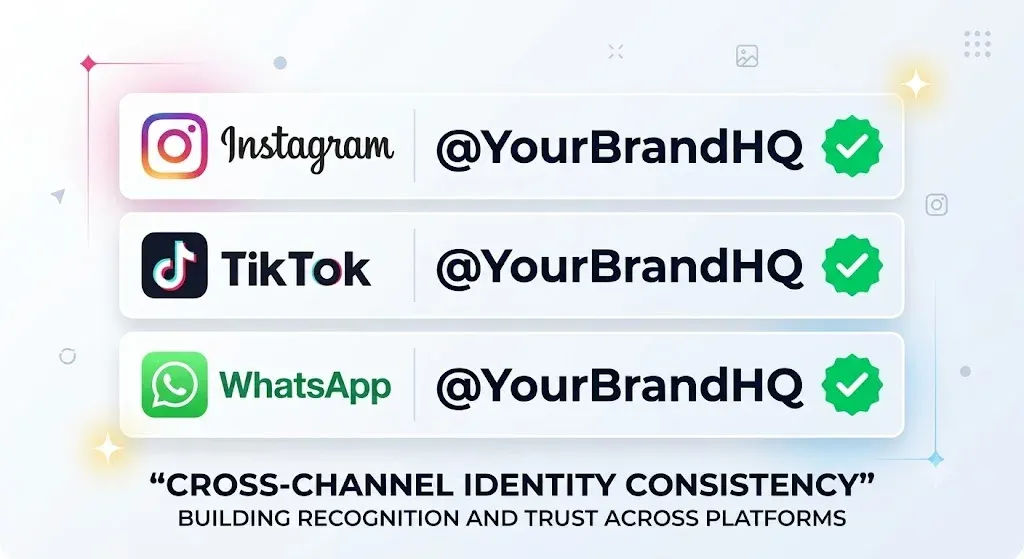
Your Instagram username should ideally be identical to your TikTok handle and your Messenger URL.
When you run a cross-platform campaign, you want one call to action. Telling a customer to "Tag us @BrandName on Instagram, or @BrandNameOfficial on TikTok" creates friction. You want a single, recognizable identity so when you launch a WhatsApp broadcast to recover an abandoned checkout, the business profile name matches the Instagram handle they originally shopped from.
Set This Up in Reflys in Under 10 Minutes
Once you secure your username, your next step is turning the profile traffic into a conversion funnel. You can automate replies to people who comment on your posts using a comment-to-DM flow.
- Connect your new handle: Log into your Reflys dashboard and link your newly created Instagram Professional account
- Create a new flow: Go to the automation builder. Add a trigger for "User comments on a post".
- Set the keyword: Set a keyword like "SHOP" or "LINK."
- Draft the DM: Write a short reply with the link to your product page or booking calendar.
- Test the flow: Use a personal account to comment the keyword on your business post. Ensure the DM fires immediately.
This entire setup works on the You do not need a credit card to sign up and test it today at Reflys.
Safe, Official API Integration
Reflys is built entirely on the official Meta and WhatsApp Business APIs. This means there is zero risk of your new Instagram account getting banned for using unauthorized scraping tools or gray-market automation. Your messaging stays compliant with Meta's 24-hour messaging window rules.
A Reflys education client recently used this exact compliant architecture to grow their confirmed admissions by ~42% in a single admission cycle, cutting reply times from hours to seconds, with zero increase in staff.

