
The biggest WhatsApp API updates of 2026 are paid service replies and paid utility templates from October 1, longer free windows for chats from Click-to-WhatsApp ads, usernames that can hide a customer's phone number, and a ban on general-purpose AI chatbots. Together they change what your WhatsApp automation costs and how you identify customers.
None of this affects the free WhatsApp Business app. It applies to the WhatsApp Business Platform, often called the WhatsApp API: the version you connect to tools for automated replies, cart recovery and a shared inbox.
What are the latest WhatsApp API updates?
Here are the changes that matter for a store, in date order. Each one comes from the WhatsApp Business Platform changelog or the Meta page linked in its section.
| Date | Update | What it means for your store |
|---|---|---|
| July 1, 2025 | Per-message pricing replaced per-conversation pricing | You pay for each delivered template, not each 24-hour conversation |
| October 7, 2025 | Messaging limits moved from each phone number to the business portfolio | All your numbers share one sending limit |
| January 15, 2026 | General-purpose AI chatbots banned from the Platform | AI that answers questions about your business is still allowed |
| Early April 2026 | Business-scoped user IDs (BSUIDs) appear in webhooks | Your tools start receiving a new customer ID |
| June 29, 2026 | Businesses can reserve a WhatsApp username | Customers can find you by handle, not only by number |
| October 1, 2026 | Service messages billed after 1,000 free per month; utility templates billed inside the 24-hour window | Automated replies now have a cost at volume |
What changed in WhatsApp API pricing on October 1, 2026?
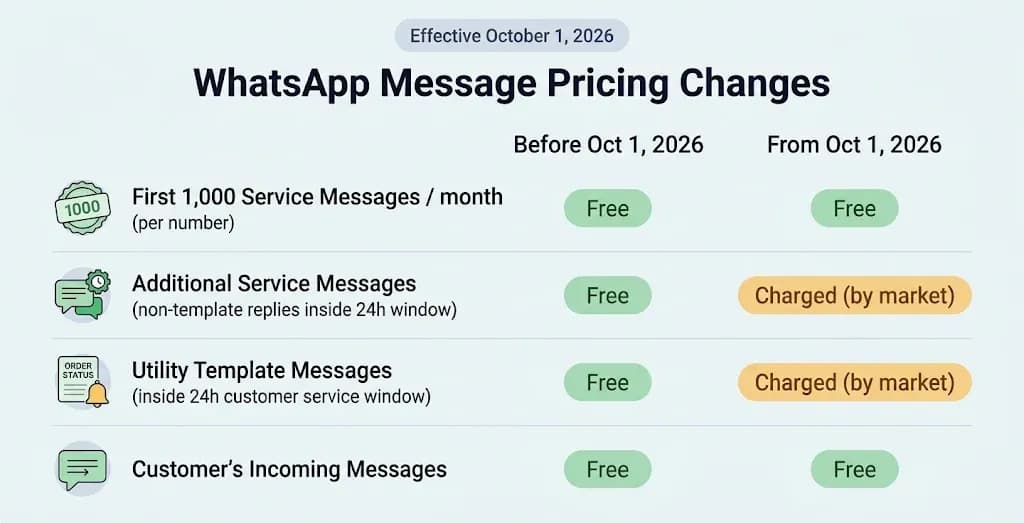
From October 1, 2026, Meta charges for service messages, the free-form replies you send inside the 24-hour customer service window. Each business phone number gets 1,000 free service messages a month, and charges start from the 1,001st. Unused messages don't roll over.
The same date ended free utility templates inside the window. Utility templates are pre-approved messages for order and delivery updates. They had been free in an open window since July 1, 2025. The source for both changes is Meta's WhatsApp Business Platform pricing page.
| Message type | Before October 1, 2026 | From October 1, 2026 |
|---|---|---|
| Service reply (free-form, inside 24h window) | Free | Free for the first 1,000 per number each month, then charged |
| Utility template inside the window | Free | Charged per message |
| Marketing and authentication templates | Charged | Charged |
| Any message in a Click-to-WhatsApp ad window | Free | Free; window can last up to 7 days |
The ad row matters for stores that run Click-to-WhatsApp ads. When a shopper messages you from one of those ads and you reply within 24 hours, a free entry point window opens. Meta's pricing page says that window can now stay open for up to 7 days, and every message type is free inside it.
What to do: Combine multi-message automated replies into one message with buttons. Three short bubbles now count as three service messages. Meta also warns that businesses without a payment method on file by September 30, 2026 may see service messages stop being delivered. Check yours in WhatsApp Manager.
Cart recovery still pays off. A Reflys restaurant client raised abandoned-cart recovery from 6% to 22% with automated WhatsApp follow-ups.
What are WhatsApp usernames and BSUIDs?
WhatsApp usernames let people message a business without showing their phone number. When a customer uses one, your tools may get a business-scoped user ID (BSUID) instead of the number. A BSUID is a customer ID that only works for your business.
Meta's BSUID documentation sets out the timeline. BSUIDs started appearing in webhooks in early April 2026. Businesses could reserve usernames from June 29, 2026, and messaging by BSUID started in July 2026. Meta is rolling out customer usernames gradually through the year.
Three details matter for stores:
- The phone number may be missing. Your store or CRM can't rely on it as the only customer key anymore.
- Authentication templates still need a phone number. That includes one-time passcodes. They can't be sent to a BSUID.
- A BSUID changes if the customer changes their number. Meta sends a system message that links the old and new IDs.
What to do: Ask your messaging provider whether it stores BSUIDs and sends to them. Meta says BSUID support is required for all partners and directly integrated businesses.
Can you still use AI chatbots on WhatsApp?
Yes, if the AI serves your own customers. Since January 15, 2026, the WhatsApp Business Solution Terms bar AI providers from using the Platform when AI is the "primary (rather than incidental or ancillary) functionality." The terms were last modified on March 6, 2026.
This ruled out general assistants like ChatGPT on WhatsApp. An AI flow that answers questions about your products, orders or bookings is a supporting feature, so it stays allowed. Avoid open-ended "ask me anything" bots on your number.
How do WhatsApp messaging limits work now?
Messaging limits how many customers you can start new conversations with in a rolling 24-hour period. Since October 7, 2025, all numbers in a business portfolio share one limit, according to Meta's messaging limits documentation. One busy broadcast number can now use up the limit for your order-update number, so space out large campaigns.
Set This Up in Reflys in Under 10 Minutes
Here is a WhatsApp auto-reply that answers common store questions in one message, which keeps it cost-aware under the October 2026 pricing:
- Start your trial. Sign up at app.reflys.com/register.
- Connect WhatsApp. Link your WhatsApp Business number through Meta's official sign-up flow. Reflys runs on the official WhatsApp Business API.
- Create a flow. In the automation builder, name it "Store FAQ."
- Set the trigger. Use keywords such as ORDER, SHIPPING, RETURN and SIZE.
- Write one combined reply. Put the answer and two or three buttons ("Track my order," "Returns," "Talk to a person") in a single message, not three.
- Route the hand-off. Send "Talk to a person" taps to your team inbox with a tag.
- Test it. Message your business number from a second phone and check the reply and the hand-off.
Need help? The Reflys help center has a tutorial for each step, and the Reflys WhatsApp page covers broadcasts and cart recovery.
Every Reflys plan starts with a 7-day trial. You add a payment method to start, but you aren't charged until the trial ends, and you can cancel before then. Start your trial and build this flow on your own number.
Why does using the official API matter now?
Meta enforces every update above on the official WhatsApp Business Platform. Reflys is built on the official Meta and WhatsApp Business APIs, with no scraping or unofficial workarounds, so your number avoids the ban risk gray-market tools carry.
Reflys holds a 4.9 out of 5 rating on G2 (9 reviews, as of November 2026). Billing runs through Stripe.
The bottom line
WhatsApp automation still pays off in 2026, but it now rewards fewer, better messages. Send one clear reply instead of three. Use Click-to-WhatsApp ads for the free 7-day window. Store customer IDs alongside phone numbers. Start your 7-day Reflys trial and build a cost-aware WhatsApp flow today.