
How to Close Your Reflys Account
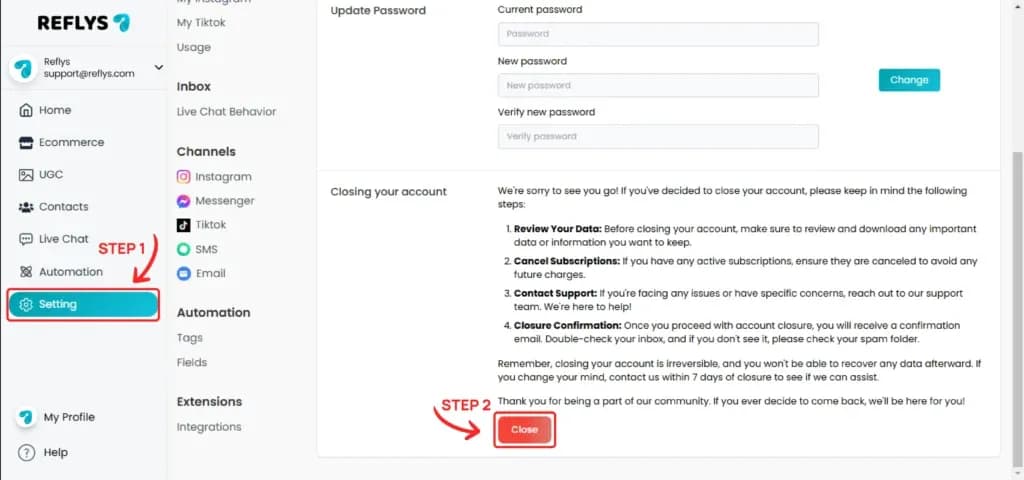
Go to Settings > General. At the bottom of the page, find the Closing your account section. Read the steps, then click Close.
Enter your account password and click the 'Close Account' button.
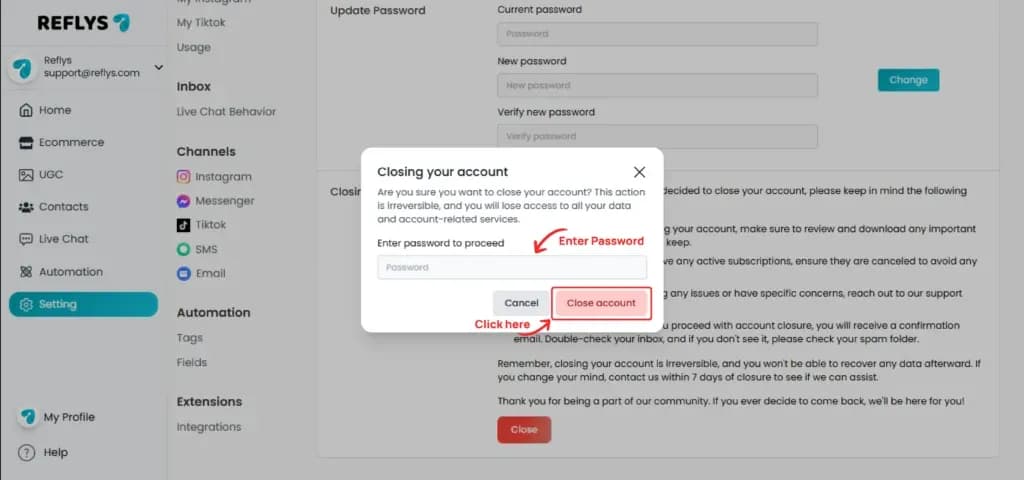
You will now be logged out, and your account will be closed.
Before you close your account
- Cancel any paid Pro or Business subscription first. If a paid subscription or free trial is still active, closing is blocked with the message "Please cancel your active subscription". A cancelled plan stays active until the end of its billing period or free trial, so you can close the account after that date.
- Download or note any data you want to keep, such as contacts and automation content. Closing is irreversible.
- Only the account owner can close an account. Team members see a Leave Account option instead, which removes them from the team without closing it.
What happens after you close your account
You are logged out and lose access to your data and account services. Team memberships linked to the account are removed, so team members can no longer switch into it. If you change your mind, contact our support team within 7 days of closing to see if we can help.
Why does it say my password does not match?
The password you enter must be your current Reflys login password. If you see "Password does not match with our records", reset your password first and try again.